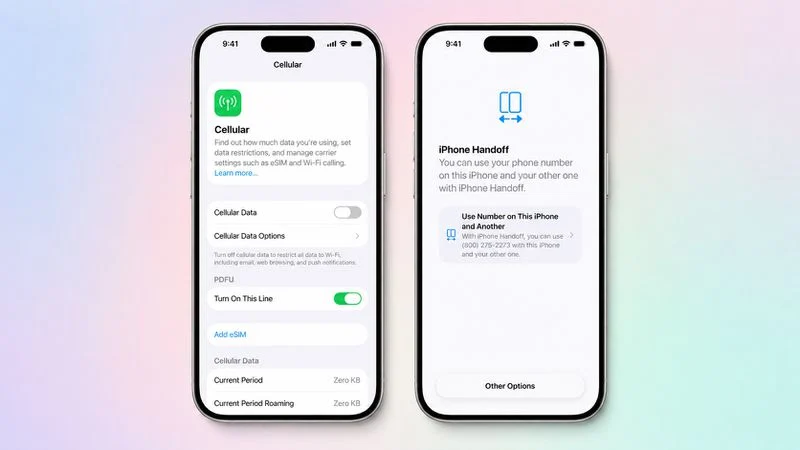
Have two iPhones but hate dealing with two phone numbers? T-Mobile users may finally have a much easier solution.
Apple’s new iPhone Handoff feature in iOS 27 is designed for people who want to use one phone number across two iPhones without constantly moving a physical SIM card or going through the hassle of transferring an eSIM every time they switch devices.
For anyone who keeps an older iPhone as a backup, carries a separate work and personal phone, or simply likes switching between two iPhones, this could be one of those small iOS features that makes everyday life noticeably easier.
But there’s an important catch: iPhone Handoff does not mean both iPhones will ring at the same time.
Instead, your phone number can move between the two supported iPhones as you switch devices.
So, how does it work with T-Mobile? Who should use it? What problems does it actually solve? And what do you need before setting it up?
Here’s the practical guide.
Who Is iPhone Handoff Actually For?
Before getting into the technical details, let’s answer the question most people really care about:
“Why would I want this?”
If you recognize yourself in any of these situations, iPhone Handoff could be particularly useful.
You Have Two iPhones
Maybe you upgraded to a new iPhone but kept your old one.
Or perhaps you simply like having two different iPhones for different situations.
Normally, the second phone becomes little more than a Wi-Fi device unless you give it another cellular line.
iPhone Handoff changes that experience by allowing the same supported phone number to move between the two iPhones.
You Use Separate Work and Personal Phones
This is another obvious use case.
You might have one iPhone that you prefer for work and another that you use outside the office.
The problem is that your main phone number traditionally stays tied to one device.
That can make switching between phones annoying.
With Handoff, the idea is much simpler: keep your number and switch the iPhone you’re using.
You Like a Bigger Phone at Home but a Smaller Phone on the Go
Not everyone wants to carry a huge phone everywhere.
Maybe you prefer a larger iPhone when you’re working, watching videos, or browsing at home, but want a smaller or lighter device when you’re out.
Instead of constantly moving your SIM or setting up another line, Handoff gives you a more convenient way to move your cellular service between supported iPhones.
You Keep an iPhone as an Emergency Backup
A spare iPhone can be extremely useful when your main phone is lost, damaged, or simply runs out of battery.
But a backup phone without cellular service isn’t nearly as useful in an emergency.
Handoff can make that second iPhone much more practical because the same phone number can be switched to it.
What Problem Does iPhone Handoff Solve?
The biggest problem is surprisingly simple:
Switching phones can be a pain.
Moving a physical SIM card is annoying.
Transferring an eSIM can take additional steps.
And getting a second phone number just because you occasionally want to use another iPhone isn’t always what you want.
Apple’s iPhone Handoff is essentially designed to remove that friction.
Instead of thinking:
“How do I move my number to my other phone?”
You can think:
“Which iPhone do I want to use right now?”
That’s a much better user experience for people who regularly switch devices.
How Does T-Mobile iPhone Handoff Work?
The basic concept is straightforward.
You have:
iPhone A → Your main iPhone
and
iPhone B → Your second iPhone
Both devices are associated with your Apple Account and meet Apple’s requirements.
Once Handoff is configured, your supported T-Mobile phone number can be moved to the iPhone you’re using.
When you switch to the other iPhone, the number switches with it.
Think of it less like cloning a phone number and more like moving your active cellular identity from one iPhone to another.
That’s why it’s important not to confuse Handoff with traditional multi-device calling services.
Will Both iPhones Ring at the Same Time?
No.
This is probably the biggest misconception about the feature.
iPhone Handoff isn’t designed to make two iPhones ring simultaneously when someone calls your number.
Instead, the phone number is switched between the supported devices.
For example:
You are using iPhone A in the morning.
Later, you unlock iPhone B and switch to it.
Your phone number becomes active on iPhone B.
So the basic idea is:
iPhone A → Active
then
iPhone B → Active
rather than:
iPhone A + iPhone B → Both ringing
If your goal is specifically to have two phones ring at the same time, Handoff isn’t the same thing as a traditional simultaneous-ring service.
Does T-Mobile Support iPhone Handoff?
Yes. T-Mobile is currently one of the U.S. carriers listed by Apple as supporting iPhone Handoff.
That’s a big reason the feature has attracted attention from T-Mobile customers.
However, there’s an important distinction:
Having iOS 27 does not automatically guarantee that every cellular account can use Handoff.
The feature depends on carrier support as well as Apple’s software.
That means your iPhone can technically support Handoff while your specific carrier account, plan, or setup may still need to meet additional requirements.
For T-Mobile customers, the best place to start is by checking the cellular settings on your iPhone after updating to iOS 27.
What Do You Need Before Setting Up iPhone Handoff?
Don’t start troubleshooting before checking the basics.
You’ll want to make sure both iPhones meet Apple’s requirements.
1. Both iPhones Need iOS 27
Because Handoff is an iOS 27 feature, both iPhones need to be running a supported version of iOS.
If one phone is still running an older version, update it first.
2. Both iPhones Should Use the Same Apple Account
The two devices need to be associated with the same Apple Account.
This helps Apple connect the devices and provide the services needed for the Handoff experience.
3. Check iMessage and FaceTime
Before setting everything up, make sure your communication services are working correctly.
Check that:
- iMessage is enabled
- FaceTime is signed in
- Messages in iCloud is enabled
- Both iPhones have Wi-Fi access
These settings can make the difference between a smooth setup and a confusing one.
4. Your T-Mobile Service Must Support Handoff
This is the big one.
Even if both iPhones are compatible with iOS 27, the cellular service still needs to support Apple’s Handoff functionality.
If the option doesn’t appear, don’t immediately assume that your iPhone is broken.
The issue could be related to carrier support or account eligibility.
How to Set Up iPhone Handoff With T-Mobile
Once your devices are ready, the setup revolves around the cellular and eSIM settings.
Start by updating both iPhones to iOS 27.
Then make sure both devices are signed into the same Apple Account and connected to Wi-Fi.
On the iPhone you want to add to the service, go to:
Settings → Cellular
Look for the option to set up or add cellular service.
If your devices and T-Mobile account are eligible, your other iPhone may appear as an available device during the setup process.
Follow the instructions displayed on the screen to complete the eSIM and cellular setup.
Once the process is finished, the second iPhone can be used as the other supported device for your phone number.
What Happens When You Switch iPhones?
This is where the feature starts to feel genuinely useful.
Imagine you normally use an iPhone 17 Pro at work.
You also have another iPhone that you prefer when you’re traveling.
With traditional SIM management, switching between them can be a hassle.
With Handoff, the experience is designed to be much simpler.
Unlock the iPhone you want to use, follow the Handoff process if prompted, and the phone number can switch to that device.
The result is much closer to:
“Pick up the phone you want to use.”
Instead of:
“Stop what you’re doing and transfer your SIM.”
That’s a surprisingly meaningful difference for people who switch devices frequently.
What Happens to Calls and Messages?
Handoff is designed to carry your phone-number-based communication experience with the active iPhone.
That includes phone calls and voicemail, along with supported messaging services.
Apple’s implementation is intended to make the transition feel less like setting up a completely new phone and more like changing which iPhone is currently handling your cellular service.
For people who already use two iPhones, that’s the key benefit.
You don’t need to create a completely separate identity for the second device just because you want to use it occasionally.
Does T-Mobile Charge Extra for iPhone Handoff?
This is one area where you shouldn’t assume the answer is automatically “free.”
Apple notes that carrier fees may apply.
That means the actual cost can depend on your T-Mobile service and account.
Before setting up Handoff permanently, check the latest T-Mobile information associated with your account.
This is especially important if you’re comparing Handoff with simply adding a second cellular line.
The two options aren’t necessarily the same thing.
iPhone Handoff vs. Getting a Second T-Mobile Number
So why not just add another phone line?
Because the two setups solve different problems.
A Second T-Mobile Line
You have:
Phone number A
and
Phone number B
They’re separate numbers and can operate as separate cellular lines.
iPhone Handoff
You have:
One phone number
and
Two supported iPhones
The goal is to let that number move between the devices.
So if you don’t actually need a second phone number, Handoff can make much more sense for the way you use your phones.
What Are the Limitations?
As convenient as Handoff sounds, it isn’t magic.
The biggest limitation is that it isn’t a system for making two iPhones behave like completely identical phones at the same time.
Again, the phone number is designed to switch between devices, not simply become active on both simultaneously.
Some carrier-specific features may also remain tied to the primary iPhone.
There can also be limitations involving certain Wallet features, transportation cards, identity credentials, and other device-specific functions.
Apple Watch behavior should also not be assumed to work exactly the same way across both iPhones.
In other words, Handoff is best viewed as a cellular-number switching feature, not a complete device-cloning system.
What If iPhone Handoff Doesn’t Appear?
Don’t panic if you update to iOS 27 and can’t find the feature immediately.
Go through this checklist:
1. Are both iPhones running iOS 27?
2. Are both devices signed into the same Apple Account?
3. Are both connected to Wi-Fi?
4. Is iMessage enabled?
5. Is FaceTime signed in?
6. Is Messages in iCloud enabled?
7. Does your T-Mobile service support Handoff?
If everything on the iPhone side looks correct, carrier eligibility becomes one of the first things to investigate.
In other words, repeatedly restarting your iPhone probably won’t solve a problem caused by carrier-side support.
T-Mobile iPhone Handoff: Quick FAQ
Can I use one T-Mobile number on two iPhones?
Yes, if the devices and T-Mobile service meet the requirements for iPhone Handoff.
Will both iPhones ring?
No. Handoff is designed to switch the active phone number between the supported iPhones rather than make both phones ring simultaneously.
Do I need to move my physical SIM?
No. The feature is designed around eSIM and carrier-supported cellular service.
Do both iPhones need iOS 27?
Yes, both devices need a supported version of iOS 27.
Do both iPhones need the same Apple Account?
Yes.
Do I need Wi-Fi?
Wi-Fi is part of Apple’s setup requirements, so both devices should be connected during setup.
Is iMessage required?
Apple’s requirements include having Messages in iCloud enabled, along with iMessage and FaceTime configured.
Does T-Mobile charge for Handoff?
Carrier fees may apply, so check your current T-Mobile account and service information.
Is this the same as having two phone lines?
No.
A second line gives you another phone number. Handoff is designed to let one supported phone number move between two iPhones.
T-Mobile iPhone Handoff at a Glance
| Question | Answer |
|---|---|
| Can one number work with two iPhones? | Yes, with supported Handoff service |
| Does T-Mobile support it? | Yes |
| Will both phones ring? | No |
| Do I need to swap a physical SIM? | No |
| Is eSIM involved? | Yes |
| Do both phones need iOS 27? | Yes |
| Same Apple Account? | Yes |
| Is Wi-Fi needed during setup? | Yes |
| Could there be an extra charge? | Possibly |
| Is it the same as having two phone lines? | No |
| Best for | People who regularly switch between two iPhones |
The Bottom Line: One Number, Two iPhones, Less Hassle
For people who only own one iPhone, iPhone Handoff might not sound revolutionary.
But if you regularly use two iPhones, the appeal is obvious.
Maybe you keep an older iPhone as a backup.
Maybe you use separate devices for work and personal life.
Maybe you simply like switching between different iPhones depending on where you are.
Before Handoff, moving your number between devices could be unnecessarily annoying.
Now Apple is making that process much more seamless for supported carrier customers.
For T-Mobile users, the biggest thing to remember is this:
iPhone Handoff is not about making two iPhones ring at once. It’s about letting one phone number move between two supported iPhones.
If that’s exactly the problem you’ve been trying to solve, iOS 27’s new feature could be a very welcome upgrade.
Before setting it up, make sure both iPhones are running iOS 27, signed into the same Apple Account, properly configured for Apple’s messaging services, and eligible through T-Mobile.
Then the idea is refreshingly simple:
Two iPhones. One number. Much less SIM-swapping.